
Description
Pass payment processing fees to your customers with total accuracy, flexibility, and control. Whether you run classic WooCommerce shortcode checkouts or modern Gutenberg Checkout Blocks, this lightweight, high-performance plugin automatically applies fixed or percentage-based convenience fees based on selected payment methods.
🌟 Key Features
-
Universal Block & Shortcode Support: Built from the ground up to support both classic WooCommerce shortcode checkouts and modern Gutenberg Cart & Checkout Blocks.
-
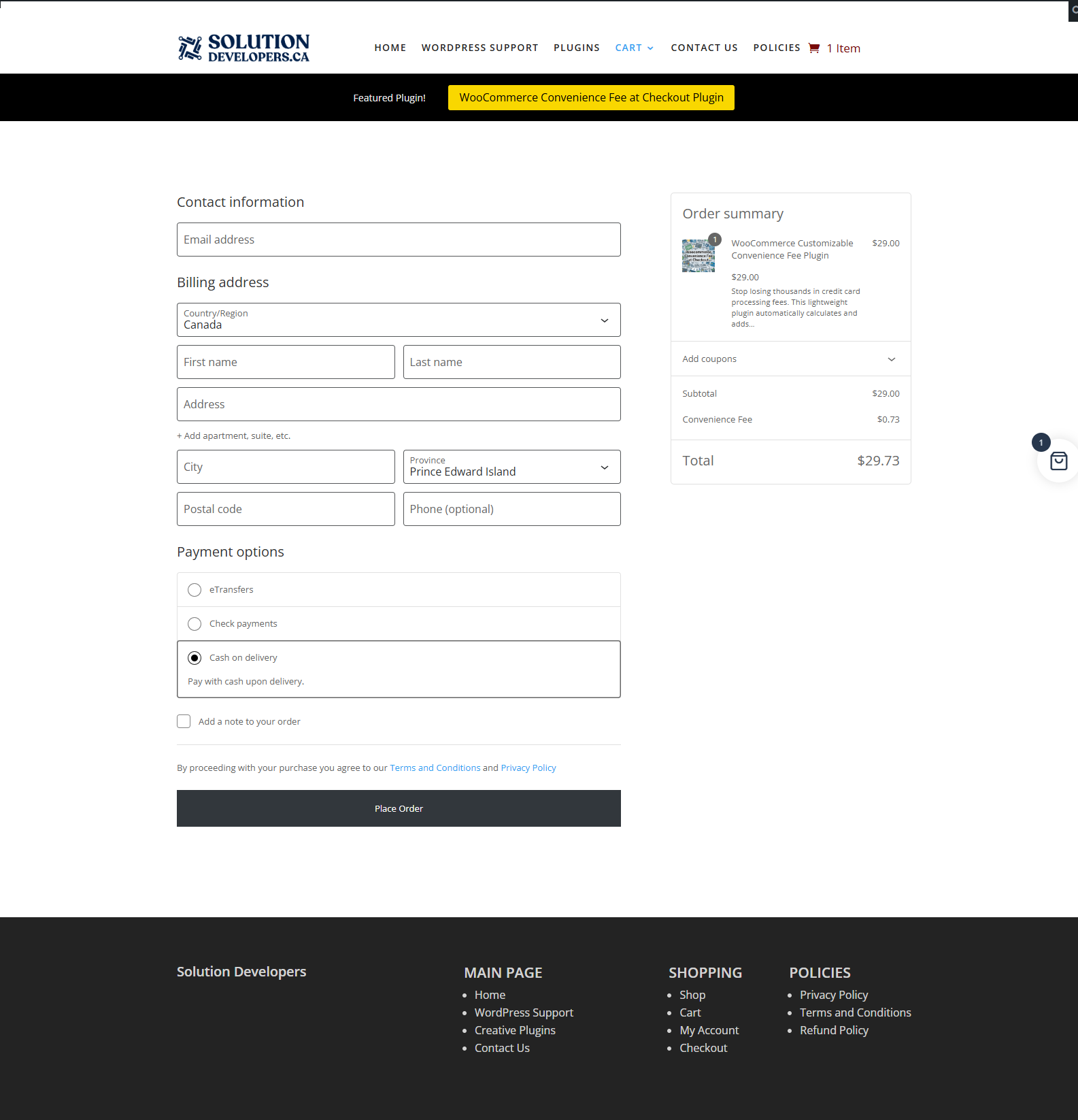
Instant Dynamic Calculation: Automatically calculates and updates fees instantly when a customer switches payment methods at checkout.
-
Flexible Calculation Engine:
-
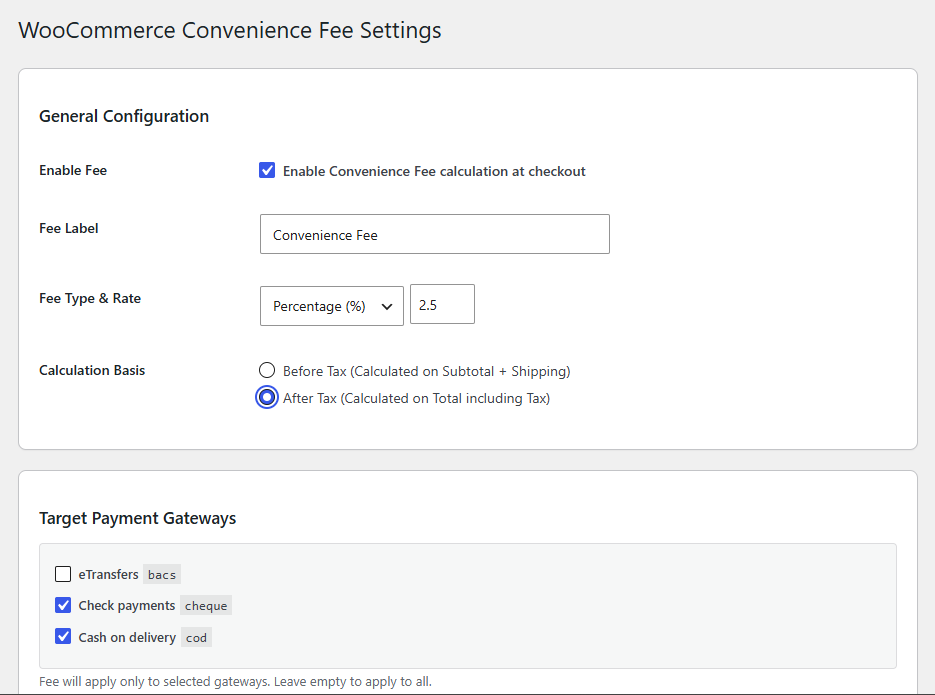
Percentage Fees: Charge a percentage of the order (e.g., 2.3%).
-
Fixed Amount Fees: Charge a flat dollar amount per transaction (e.g., $3.50).
-
-
Tax Calculation Control:
-
After-Tax Calculation: Calculate fee percentages on the total order value including tax (fee itself is untaxed).
-
Before-Tax Calculation: Calculate fee percentages on the subtotal alone, with tax automatically applied to the fee line item.
-
-
One-Click e-Transfer & BACS Exclusion: Built-in checkbox setting to instantly bypass fees for Interac e-Transfers, Direct Bank Transfers (BACS), and manual payment methods.
-
Target Specific Payment Gateways: Restrict fees only to specific payment providers (e.g., Stripe, PayPal, Helcim, Credit Card) while keeping zero-fee options open for customers.
-
1-Click Gateway Auto-Detection: Automatically detects all installed and active payment gateways in your store and gives you one-click buttons to add or remove them from your fee settings.
-
Customizable Fee Labeling: Set a custom label for the line item in the checkout total breakdown (e.g., “Convenience Fee”, “Credit Card Processing Fee”).
-
Full HPOS & WooCommerce 8.9+ Compatibility: High-Performance Order Storage (HPOS) ready out of the box for fast database operations and modern WooCommerce installations.
📊 Technical Specifications
| Feature | Details |
| Plugin Version | 2.8.6 |
| WooCommerce Tested | Up to WooCommerce 8.9+ |
| HPOS Compatible | Yes (custom_order_tables) |
| Cart/Checkout Blocks | Fully Compatible |
1. Highlight “Compliance & Transparency”
Point out that using custom fee labels helps store owners stay compliant with local payment processor surcharge rules (e.g., clearly labeling card surcharges vs. service fees).
2. FAQ / Troubleshooting Quick Guide
-
Q: Does this work with multi-currency plugins?
-
A: Fixed fee amounts follow the base store currency set in WooCommerce settings, while percentage fees adjust dynamically based on cart values.
-
-
Q: Will it slow down my site?
-
A: No, the plugin is lightweight, adds no unnecessary external API calls, and runs calculation hooks natively during WooCommerce standard cart/checkout totals calculation.
-
-
Q: What happens if a customer changes their payment method at checkout?
-
A: The fee updates in real-time. Selecting an excluded payment method (like e-Transfer) immediately removes the fee line item without refreshing the page.
-


Reviews
There are no reviews yet.